ebtEDGE NEW!
- 3.1
- Rating
- 100.00K
- Installs
- Free
- Price

 Analysis by App-foxy
Managing SNAP, Childcare, or WIC benefits is one of those jobs where a small delay or confusing screen can create a surprisingly stressful moment. ebtEDGE is built for that practical task: it is a finance app from Fidelity Information Services LLC that brings state benefit-account information to a phone. I approached it less like a general banking app and more like a tool I would open when I need a quick answer before shopping, checking an account, or planning the next few days.
The app is free and rated for Everyone, which makes sense for a service used by households with different ages and levels of technical confidence. Its purpose is narrow, and that is a strength. You are not opening it for budgeting lessons, investment research, or a broad view of every financial account you own. You are opening it to deal with benefit information connected to your state. That focused role also sets the right expectations: its usefulness depends heavily on whether your state’s SNAP, Childcare, or WIC service is supported through the app and on how well the app handles the specific account workflow you need.
How ebtEDGE feels in everyday use
I find ebtEDGE easiest to judge by whether it helps me prepare before a benefit-related decision, rather than by how polished a single screen looks. In this section, I focus on the trust questions I would consider before making it part of a household routine: what the app is for, which choices remain with the user, and when I would pause before entering account details.
You May Also Like

 Blood Strike: 2.5 Anniversary
Blood Strike’s Loadouts Turn Every Drop Into a Tactical Gamble
A close look at Blood Strike’s custom loadouts: how fast access to signature weapons reshapes its battle royale rhythm, rewards preparation, and narrows the gap between fights.

 Pandora - Music & Podcasts
Pandora’s Music Is Easy to Start, but Harder to Recover
Pandora’s strength is its low-effort path from a seed to a station. Its weak spot is how much confidence it asks you to place in connection, setup, and quiet recovery.

 8 Ball Pool
 Is Built on Rivalries, Rematches, and Routine
A close look at the rivalries, rematches, shared routines, and unanswered safety questions that turn a quick pool match into a persistent mobile community.

 Samsung Music
’s Quiet Strength Is Playing What You Already Own
Its reach comes less from spectacle than from dependable access to a personal library. That simplicity is both the app’s strongest retention engine and its ceiling.

 AccuWeather: Weather Radar
AccuWeather Review: A Quick, Clear Forecast for Everyday Decisions
For everyday plans, the best forecast is the one you can understand quickly. AccuWeather makes rain timing, radar, and local conditions easy to act on, with a few trade-offs.

 Hill Climb Racing
Why Hill Climb Racing Still Turns Crashes Into One More Run
A tiny car, a bumpy hill and one more upgrade: Hill Climb Racing keeps resurfacing because its simple chaos makes every near-miss feel personal.
More From Our News Desk



Speed expectations before you depend on it
My first impression of a benefits app is not whether it looks exciting; it is whether I can get to the answer without unnecessary effort. ebtEDGE is the kind of app I would judge by the time between opening it and finding the information needed for a real decision. A clean, direct path matters more here than decorative design because the common question is usually simple: can I use my benefits for this shopping trip, and what should I know before I go?
It is important not to confuse a quick interface with instant account information. A finance app may open promptly while account details still depend on the service connection behind it. If a screen takes a moment to refresh, that does not automatically mean the phone is struggling. The practical test is whether the app gives a clear result, keeps the session understandable, and lets me recover sensibly when the connection is weak.
I would avoid opening the app for the first time in a checkout line. A better habit is to sign in while I have a stable connection, review the account information I need, and make a note of anything important before leaving home. That workflow reduces pressure and separates two problems that are easy to mix up: an account question and a poor mobile signal.
A realistic shopping scenario
Imagine I am preparing for a grocery trip and need to check my available benefit balance before deciding how much to buy. I would open ebtEDGE before leaving, sign in, review the relevant account information, and then use that result as part of my shopping plan. If I also manage WIC or Childcare benefits, I would pay attention to which benefit area I am viewing rather than assuming every balance belongs to the same program.
That distinction is one of the app’s most useful practical qualities. SNAP, Childcare, and WIC are not interchangeable in everyday planning. A family may be checking one program for groceries while monitoring another for a different household need. Treating the app as a single undifferentiated wallet could lead to bad assumptions, so I would slow down long enough to confirm the program and account context shown on screen.
I would also check information before reaching the register rather than using the app as a last-second rescue tool. If the service needs a refresh, the phone loses connectivity, or I need to authenticate again, that is much easier to handle at home than with a line behind me. This is not a criticism unique to ebtEDGE; it is a sensible operating routine for any app tied to essential benefits.
What happens during heavier use
Heavy use for this app is not the same as heavy use for a game or video editor. The demanding moments are likely to come from repeated account checks, switching between benefit-related tasks, signing in while travelling, or trying to use it during a busy shopping period. I would not expect it to place the same sustained load on a phone as an entertainment app, but that does not make responsiveness irrelevant. A short delay matters when the app is being used to answer a time-sensitive money question.
My advice is to avoid repeatedly tapping a button when a screen appears slow. With account services, repeated attempts can make it harder to tell whether the first request is still processing or whether a second attempt has started. I would wait for the screen to settle, check the connection, and then try again once. This simple habit makes troubleshooting clearer and avoids turning a temporary delay into a confusing sequence of duplicate actions.
Another useful approach is to separate routine checking from urgent checking. If I know I will shop later, I would review the account earlier in the day. That gives me time to understand what I am seeing and deal with a login or connection issue without the pressure of an immediate purchase. The app is more valuable as part of a small preparation routine than as something I remember only when the cashier is waiting.
Households that share responsibility for benefits should also be deliberate about device use. If more than one person accesses the account, I would make sure each person understands when the session is finished and avoids leaving sensitive account screens visible. The app’s finance category means convenience should not replace basic privacy awareness, especially on a shared phone.
Stability and recovery matter more than visual polish
For ebtEDGE, reliability means more than staying open. I want the app to make it obvious whether I am signed in, whether information has loaded, and whether a problem comes from the account process or the network. Those cues are especially important when the app is used for SNAP, Childcare, or WIC, because uncertainty about benefit information can affect real household decisions.
If the app does not respond as expected, my recovery sequence would be straightforward: check the connection, wait briefly, retry once, and then restart the app if necessary. I would avoid immediately uninstalling it, because that can create extra setup work without solving a temporary service problem. If the issue continues, I would use the official support route associated with the benefit service rather than relying on guesses or unofficial advice.
There is also a difference between an app crash and an account-service interruption. Restarting the app may help with the first, while it may do nothing for the second. A useful reviewer’s rule here is to observe the pattern: if the app opens normally but account information will not refresh, the problem may be outside the phone itself. That is why I would not promise that a reinstall or a newer device will fix every frustrating session.
The app’s current version is 4.0.1, so keeping it updated is a sensible maintenance step when an update is available through the relevant app store. I would still treat updates as one part of reliability, not a guarantee. An updated app can improve compatibility or correct problems, but it cannot remove every dependency on the state service, account authentication, or mobile connectivity.
Device limits and the role of the operating system
ebtEDGE supports Android devices running version 7.0 or later. That is helpful for people using older phones, although compatibility on paper is not the same as a smooth experience on every device. Older hardware may have less memory, a slower connection, or a battery that struggles with everyday tasks. For this type of app, those limits may show up as slower launches, more frequent reloads, or sessions that need to be repeated.
I would not replace a phone solely because one finance app feels less responsive. First, I would close unused apps, restart the device, confirm that the operating system is supported, and make sure there is a dependable connection. Those are low-risk steps that can distinguish a local device problem from a service problem. If other apps are also slow, the phone is a more likely part of the explanation.
On a newer device, I would expect the app to feel less burdened by basic navigation, but I would still judge it by clarity and recovery rather than by animation speed. Benefits information does not become more useful because a screen opens dramatically faster if the account context is unclear. The best performance is the kind that gets me to the correct information without making me wonder whether the result is current or incomplete.
People using iOS should pay attention to the version and device requirements shown in the relevant store before installing. The app is presented as an Android and iOS benefit tool in its general purpose, but the actual experience can vary between platforms. I would not assume that a layout, login flow, or update behaves identically on every phone. That is a reason to test the app calmly before depending on it for an important trip.
Where it beats ordinary alternatives
The usual alternatives are often less convenient: calling a service, visiting a website in a browser, or relying on printed information and memory. A phone app can be easier to keep available when I need to check benefit information away from home. It also puts the task in a familiar device rather than requiring a separate computer or a trip to an office.
Compared with a general banking app, ebtEDGE is better suited to people whose main concern is benefit-account access rather than checking, savings, credit cards, or bills. A normal bank app may offer broader financial tools, but it is not a substitute for an official SNAP, Childcare, or WIC channel. I would not expect a bank application to provide the same state-benefit context simply because both apps involve money.
Compared with a browser, the app may be more comfortable for repeated use because it is already installed and designed around a mobile session. The trade-off is that a browser can sometimes be useful when an app has a device-specific problem or when I need to try a different sign-in environment. I would keep the browser as a fallback, not because ebtEDGE has no value, but because essential account access benefits from having a second practical route.
Compared with calling, the app is more private and convenient for a quick check when the service is working. A phone conversation may be preferable when the issue is complicated, the account needs attention beyond a routine review, or I cannot tell what an on-screen message means. The right choice depends on the task: use the app for straightforward access, and choose human assistance when interpretation or correction is the real need.
Three habits that make the app more useful
- Check before the trip, not at the register. This gives the app time to load and gives me time to understand the account area I am viewing.
- Separate program context from total household money. SNAP, Childcare, and WIC should be treated as distinct benefit areas during planning, even when one household manages them together.
- Use a calm recovery sequence. Confirm connectivity, wait, retry once, and restart only when necessary instead of repeatedly tapping or reinstalling immediately.
- Keep a fallback in mind. If the app cannot complete a task, a browser or official support channel may be more appropriate than spending the entire shopping trip troubleshooting.
These habits are more important than trying to make the app do something it was not designed to do. ebtEDGE is not a replacement for every benefit-service interaction, and I would not use it as a general household budgeting system. Its best role is a focused access point that helps me make informed decisions about the benefits connected to my state.
Who should use it, and who may prefer something else?
I would recommend trying it to anyone who receives SNAP, Childcare, or WIC benefits through a participating state service and wants mobile access to that information. It is especially useful for people who check their account regularly, shop in different places, or need a convenient alternative to calling for routine information. The free price removes one obvious barrier, and the Everyone age rating makes it suitable for a broad household audience.
I would be more cautious about relying on it as the only option if my phone is very old, my connection is unreliable, or I frequently need assistance with account problems rather than simple account viewing. In those situations, a browser, phone support, or an in-person service may be more dependable for the specific task. I would also skip treating it as a full personal-finance manager; its value comes from its benefit focus, not from replacing a bank or budgeting application.
The app has reached over one hundred thousand installs, while its average rating is 3.2 from roughly 661 ratings. I read that combination as a reason to keep expectations practical rather than dismissing the app outright. A finance tool can be genuinely useful for one person and frustrating for another because access, state support, device age, and account needs differ. The rating suggests that the experience is not universally smooth, so I would test the workflow before making it central to an urgent routine.
My performance verdict
After looking at ebtEDGE as a working tool rather than a flashy mobile product, I see its main strength in focus. It addresses a specific need for SNAP, Childcare, and WIC users and offers a more convenient route than calling or finding a computer for every routine check. Its performance should be judged by whether it gives dependable access with understandable recovery, not by entertainment-app standards.
The limitations are equally practical. Account access may still depend on connectivity and the underlying service, older devices may feel less comfortable, and the app should not be mistaken for a universal solution to complicated benefit questions. I would prepare ahead of time, keep a fallback available, and pay close attention to which benefit program I am reviewing.
For eligible users, I think ebtEDGE is worth trying because it is free, narrowly focused, and potentially useful during ordinary planning. I would recommend it as a convenient first stop, not as the only safety net. If it fits my state service and works reliably on my phone, it can remove a lot of small friction from benefit management. If it does not, the sensible response is to use the browser or official support route rather than forcing the app into a role it cannot fill.
My bottom line: ebtEDGE is a practical finance app for checking state-linked benefits, with its greatest value appearing before a shopping trip or routine household decision. I would install it, test it under calm conditions, and keep expectations realistic about speed, connectivity, and recovery. That combination makes it a useful companion for many benefit recipients, even if it is not a complete answer for every account problem.
FAQs for ebtEDGE NEW!
01What is ebtEDGE NEW! used for?
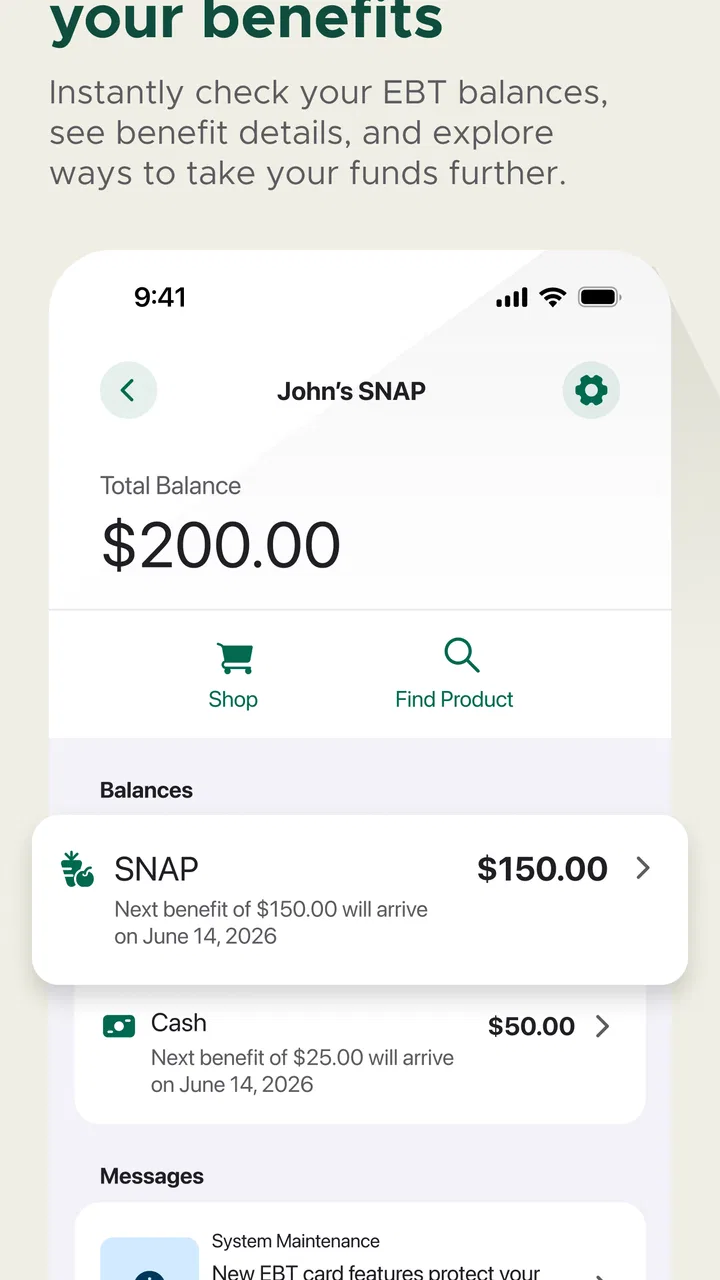
ebtEDGE NEW! is a mobile companion for people who use eligible government benefit cards, such as SNAP or cash assistance cards, depending on the state or program. After signing in, users can typically review their available balance, check recent transactions, locate participating retailers or ATMs, and manage certain card settings. The exact features can vary by state and benefit program.
02How do I sign in to ebtEDGE NEW!?
To use ebtEDGE NEW!, you generally need an active EBT card account and the login details associated with your state’s EBT service. Depending on your location, the app may request your card number, username, password, PIN, or additional verification. If you have never registered, follow the in-app enrollment instructions. Make sure you download the official application and avoid entering card information into unofficial websites or apps.
03Can I check my EBT balance and transaction history in the app?
Yes, checking your current benefit balance and reviewing recent transactions is one of the main reasons users install ebtEDGE NEW!. The app can help you see deposits, purchases, withdrawals, and remaining funds without calling customer service. However, balances may not update instantly after every transaction, and available information can depend on your state, card type, network connection, and the processing time of the retailer or agency.
04Does ebtEDGE NEW! allow me to report a lost or stolen card?
In many supported programs, ebtEDGE NEW! provides tools for managing a card that has been lost, stolen, or compromised. These may include freezing or locking the card, changing the PIN, or requesting a replacement. Options differ by state, so check the available card-management section carefully. If you suspect unauthorized activity, contact your state’s official EBT customer service number as soon as possible.
05Is ebtEDGE NEW! free, and is it available in every state?
The ebtEDGE NEW! app is generally available to download without an upfront fee, but normal mobile data charges may apply. Availability and supported functions are not identical everywhere because EBT services are administered by individual states and agencies. Before downloading, confirm that your state and card program are supported. Also review the app publisher, permissions, privacy information, and recent user feedback to ensure you are using the official version.
Pros
- Quickly check EBT balances and recent transactions.
- Supports multiple benefit accounts in one app.
- Purchase history helps track spending and remaining funds.
- Provides access to customer service and account support.
- Useful notifications can help monitor benefit activity.
Cons
- Requires an internet connection for most account features.
- Login or verification issues may prevent access at times.
- Some users report slow loading during busy periods.
- The interface can feel dated and less intuitive than modern banking apps.
- Availability and features may vary by state or benefit program.

ebtEDGE NEW!
Gallery